
Direct Answer
To choose the right wireless barcode scanner, businesses should match scanner type to the scanning environment, barcode type, distance requirements, and connectivity needs. Most warehouses benefit from Bluetooth or 2.4G wireless scanners with strong decoding performance, durable housing, and long battery life. Buyers should also evaluate integration with POS, ERP, and WMS systems to reduce downtime and data errors.
Key Takeaways
-
A wireless barcode scanner improves mobility and speeds picking, packing, and inventory workflows.
-
Bluetooth scanners work well for short-range flexibility, while 2.4G often supports stronger dock-based workflows.
-
Scanning performance depends on barcode quality, lighting, and decoding capability.
-
Businesses should evaluate durability, drop rating, and environmental resistance.
-
Integration and support matter as much as hardware specs for total lifecycle cost.
Why wireless barcode scanners are a smart investment for operations teams
Warehouses, logistics providers, and retail stockrooms depend on fast identification. If workers must stay tethered to a workstation, productivity drops.
A wireless barcode scanner solves this problem by allowing workers to move freely across aisles, loading docks, and packing stations. For many businesses, the productivity gain is immediate.
For purchasing managers, wireless scanning is also about risk reduction. Faster scanning means fewer manual entries, fewer shipping mistakes, and fewer inventory discrepancies.
What is a wireless barcode scanner?
A wireless barcode scanner is a handheld scanner that transmits scanned barcode data to a computer, POS system, or mobile device without a physical cable. Most wireless scanners use Bluetooth or a proprietary 2.4 GHz wireless connection.
Wireless scanners are widely used in warehouses, retail stores, manufacturing, and logistics operations.
Definition:
A wireless barcode scanner is an AIDC device that reads 1D and 2D barcodes and sends the decoded data to a host system using wireless connectivity such as Bluetooth or 2.4 GHz radio. Wireless barcode scanners improve productivity by enabling workers to scan items without being restricted by cables, especially in warehouses and distribution centers.
What types of barcodes should your wireless scanner support?
Before choosing any scanner, confirm the barcode type in your workflow.
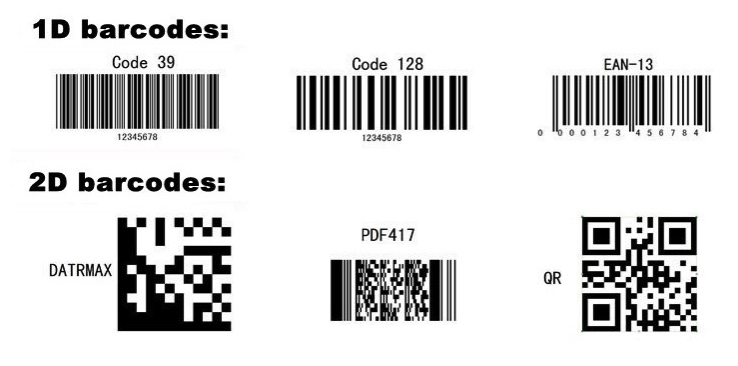
1D barcodes
1D barcodes store information in a single horizontal direction. They are common on retail products and shipping cartons.
They scan quickly and are inexpensive to print.
2D barcodes (QR codes, DataMatrix)
2D barcodes store much more information, including text, serial numbers, and sometimes Chinese characters. QR codes are widely used in logistics labels, manufacturing traceability, and payment workflows.
RFID is not the same as barcode scanning
RFID uses electronic tags with chips and antennas. RFID can read multiple items at once without line-of-sight. Barcodes require visual scanning but are cheaper to deploy.
Most businesses still rely heavily on barcode scanners because barcode labels cost less and are easier to implement.
Wireless barcode scanner vs wired scanner: what is the difference?
A wired scanner is often cheaper and simpler, but wireless scanning provides major operational flexibility.
| Feature | Wireless Barcode Scanner | Wired Barcode Scanner |
|---|---|---|
| Mobility | High | Low |
| Setup | Requires pairing/dock | Plug-and-play |
| Best use case | Warehouses, logistics | Fixed POS stations |
| Battery requirement | Yes | No |
| Downtime risk | Battery charging needed | Cable wear risk |
For businesses with mobile workflows, wireless scanning usually delivers better ROI.
What wireless connectivity options are available?
Choosing the right connection type is one of the biggest purchasing decisions.
Bluetooth wireless barcode scanners
Bluetooth scanners are popular because they pair with PCs, tablets, and mobile computers. They work well in environments where workers scan near a host device.
Bluetooth is especially useful when scanners connect to Android mobile computers or tablets.
2.4G wireless barcode scanners
2.4G wireless scanners often use a USB dongle receiver. They can provide stable connections in warehouse environments where Bluetooth pairing can become complex.
These scanners are common in packing stations, shipping desks, and warehouse workbenches.
USB and serial interfaces still matter
Even when buying wireless models, buyers should understand common communication interfaces.
Barcode scanners often support:
-
USB keyboard wedge mode (USB-KBW)
-
USB virtual COM mode (USB-COM)
-
USB-HID for POS integration
-
RS232 serial communication
-
PS/2 keyboard wedge (less common today)
For integration-heavy warehouses, USB-COM and RS232 can support better command control.

What performance specs matter most for wireless barcode scanners?
Many buyers focus on scan speed, but the real issue is decoding reliability.
Barcode decoding performance
In warehouses, labels are often damaged, wrinkled, or poorly printed. A scanner must decode low-quality barcodes quickly to avoid manual entry.
This is where higher-quality area-imaging scanners outperform cheaper models.
Depth of field and scanning distance
If workers scan from shelves, pallets, or forklifts, they may need extended range. A scanner designed for close-range retail scanning may fail in warehouse aisles.
Lighting tolerance
Warehouses often have low light areas. Retail stores may have reflective packaging. Scanners should handle both.
Battery life and charging workflow
Wireless scanners require charging. Buyers should confirm:
-
shift-length battery runtime
-
battery swap capability
-
charging cradle durability
What durability features matter in warehouses?
Wireless scanners often get dropped. This is normal.
If scanners fail frequently, operations slow down and replacement costs increase.
Key durability criteria:
-
drop rating (meters or feet)
-
sealing rating (IP rating for dust and water)
-
scan window protection
-
trigger durability
In high-impact logistics environments, rugged scanners reduce lifecycle cost.
Buyer checklist: choosing the right wireless barcode scanner
Use this checklist when evaluating scanner models for warehouse or logistics procurement.
Wireless barcode scanner evaluation checklist
-
Do you need 1D only or 1D and 2D scanning?
-
What is the maximum scan distance required?
-
Are barcodes often damaged or low contrast?
-
Does your workflow require scanning from forklifts or pallets?
-
Is the scanner used indoors, outdoors, or cold storage?
-
Do you need Bluetooth pairing with mobile devices?
-
Do you prefer 2.4G dongle receivers for simpler setup?
-
What interface is required: USB-KBW, USB-COM, HID, RS232?
-
How many drops per day can the device realistically survive?
-
What is your replacement cycle and warranty requirement?
Decision criteria and trade-offs for purchasing managers
A wireless barcode scanner purchase should consider both operational needs and IT constraints.
Budget vs performance
Low-cost scanners work fine in light retail workflows. In logistics, a scanner that fails to read damaged labels creates hidden labor costs.
Integration and compatibility
If you use WMS systems, ensure scanned data feeds correctly into the workflow. Some scanners work like a keyboard wedge and are easy to deploy, but do not support command triggering.
USB-COM or HID-based scanners may support deeper integration but require IT setup.
Scalability across multiple sites
Multi-site businesses should standardize scanner models to reduce training time and spare parts inventory.
Training and workforce turnover
A scanner should be intuitive. Warehouses often hire seasonal workers, so training time must be minimal.
Compliance and traceability
In regulated industries, scanned serial numbers and batch codes must be captured accurately. Poor scanning quality increases compliance risk.
How wireless barcode scanners improve business accuracy
Wireless barcode scanners reduce manual typing, which is one of the biggest sources of warehouse errors.
Errors commonly caused by manual entry:
-
wrong SKU scanned or typed
-
incorrect quantity entered
-
incorrect shipment labeling
-
inventory count mismatches
Barcodes and QR codes provide fast identification. RFID provides multi-tag reading but costs more. Most warehouses use barcodes because they offer the best balance of cost and reliability.
Wireless scanning as part of a wholesale AIDC strategy
Wireless scanners are high-demand products for distributors and resellers. Businesses often buy scanners in bulk during warehouse expansion or system upgrades.
If you are sourcing wireless barcode scanners for resale, wholesale supply matters. Buyers want consistent stock, warranty coverage, and fast delivery.
Learn more about warehouse-ready AIDC solutions:
https://epicriseelectronics.com/pages/warehouse
Interested in wholesale supply and resale?
https://epicriseelectronics.com/pages/become-a-reseller
Conclusion: How to choose the right wireless barcode scanner
The best wireless barcode scanner is the one that matches your environment, barcode types, and integration requirements. For warehouses, focus on decoding reliability, durability, and connectivity stability. For purchasing managers, the smartest decision is choosing a scanner that reduces downtime and supports long-term scalability.
A wireless barcode scanner is not just a device. It is a productivity tool that directly impacts fulfillment speed and data accuracy.
5) FAQ
1. How do I choose the right wireless barcode scanner for my warehouse?
Choose a wireless barcode scanner based on barcode type, scan distance, durability, and connectivity. Warehouses usually require rugged scanners that can read damaged labels reliably.
2. What is the difference between Bluetooth and 2.4G wireless barcode scanners?
Bluetooth scanners pair easily with phones and tablets. 2.4G scanners often use USB dongles and provide stable connections for workstation-based workflows.
3. Are wireless barcode scanners reliable in industrial environments?
Yes, but only if the scanner is designed for warehouse use. Buyers should evaluate drop rating, IP sealing, and scanning performance on low-quality barcodes.
4. Can a wireless barcode scanner scan QR codes?
Many models can scan QR codes, but not all. Buyers should confirm the scanner supports 2D decoding if QR codes or DataMatrix labels are used.
5. What is the best interface for integrating scanners with WMS systems?
USB-KBW is easiest to deploy, but USB-COM and HID often provide better control and integration options. The best interface depends on your software environment.
6. Is RFID better than a wireless barcode scanner?
RFID can read multiple tags without line-of-sight, but RFID costs more and requires specialized labels and readers. Many warehouses still prefer wireless barcode scanners for cost-effective identification.